Your AI conversations
as files you actually own.
A local-first AI workspace for indie founders. Bring your own Claude, OpenAI, or Gemini key. Every chat becomes a real Markdown file on your machine. $49 once, no subscription.
First 100 buyers get Lifetime at $29. Get notified when sales open.

Four capabilities, one local-first app
Every feature below runs on your machine with your own API keys. Nothing you type is ever sent to a Projelli server.
Memory that indexes your work
The AI workspace that remembers your stuff. A local vector index (LanceDB + e5-small) over every Markdown file you've written, plus a memory.json facts file extracted from your chats. Ask "what did I say about pricing?" and the answer comes back with citations.
Available in every AI tool you use
Your workspace, everywhere. Projelli ships a Model Context Protocol server as a one-click .mcpb bundle. Install it in Claude Desktop, Cursor, or Zed and those clients can read, search, and (with approval) write your Projelli workspace.
AI edits side-by-side with you
The Canvas pattern, but local. Select any paragraph, ask "tighten this," watch a streaming diff land in place. Per-hunk Accept or Reject, or accept-all. Every AI edit gets logged to version history with the prompt + model + offset range, so you can always see what the AI changed.
See the 1.5 announcement →Plus a real-time API cost meter so you always know what AI is costing you.

Chat that leaves something behind
Most AI chats evaporate the moment you close the tab. In Projelli, every conversation drops real Markdown files into your workspace folder: plans, research notes, customer interviews, draft pitches. Edit inline, keep old versions, link them to anything else.
- Conversations save to your folder, not buried in chat history
- Every AI action is logged and reversible
- Follow-up prompts rewrite the document in place
- Export to Markdown, PDF, Word, or PowerPoint

A workspace that keeps your thinking connected
Any document in Projelli can link to any other. Wiki-style links, automatic backlinks, and full-text search across the whole workspace. Split panes let you keep one file open while you write in another.
- [[Wiki-links]] between any two documents
- Automatic backlinks so nothing gets orphaned
- Split-pane editing
- Full-text search across your entire workspace
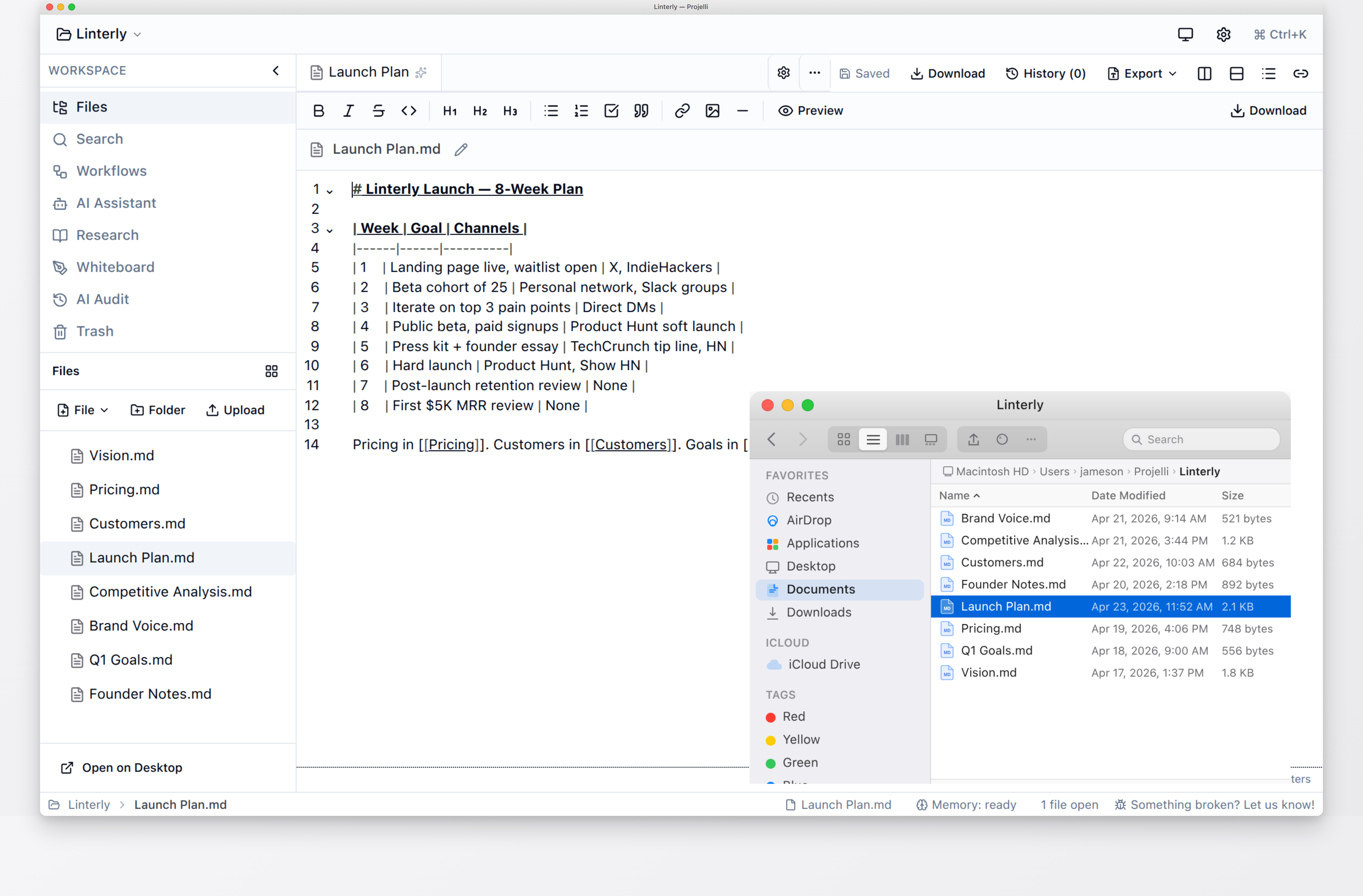
Your data lives on your computer
Projelli stores everything locally using plain Markdown files on disk. No account, nothing syncing to someone else's server. Open the workspace folder in Finder and your conversations are right there as files you can read in any text editor.
- Plain Markdown files in a folder you pick
- Works fully offline (except for AI calls)
- No account required, no telemetry
- Native desktop app built on Tauri (Rust)
15 founder workflows, ready to run
Each template asks you the right questions and produces the actual document: Vision, Pricing Strategy, Pitch Deck, Weekly Review. See real worked examples on the template gallery.
New Business Kickoff
"Freelancers in the US don't have a CFO. They have a Google Sheet, a guilty pile of unopened emails, and a quarterly panic when taxes come due."
See the full example →Pricing Strategy
"$12/month or $108/year. One tier. No freemium. 14-day trial, no credit card. Refund if the tax bucket doesn't hold enough for your Q1 estimate."
See the full example →Financial Model
"ARR target year 1: $120K. Gross margin 78%. Contribution margin per paid user: $85/year. Breakeven at 2,800 paid users in month 18."
See the full example →Three steps to get a project out of your head
No setup, no tutorial. Open the app, pick a template, start typing.
Pick a template
Start from one of the 15 founder templates or a blank project. Each template already knows the documents you probably need and helps you fill them in.
Talk to the AI
Describe the project in your own words. The AI asks a few follow-up questions, then drafts the documents you would have written yourself if you had two extra hours.
Edit and link
Fix up the drafts in the Markdown editor, link related notes with wiki-links, and keep iterating until the whole project sits in one place you trust.
Pay once. Own it.
No subscriptions. No usage limits. No surprises. Bring your own API keys for Claude, OpenAI, Gemini, or Ollama and pay your AI provider directly. Projelli takes nothing out of your inference budget.
- Core editor + workspace
- Wiki-links, backlinks, version history
- 1 AI provider (Claude only)
- 3 starter templates
- 1 workspace
- Everything in Pro
- Updates forever
- Early access to new features
- Commercial use license
- Priority support
- All 3 AI providers
- All 15 founder templates
- Unlimited workspaces
- Whiteboard, audio, research citations
- Multi-model comparison
- 1 year of updates
Past the first 100 founders? Get the regular Lifetime tier for $99, same deal, just no founder discount.
14-day refund, no questions asked. Sold via LemonSqueezy as merchant of record (handles tax for you).
Built by
Jameson Daines
Projelli is built by Jameson Daines, a Senior Product Designer with eight years of experience designing health products at Samsung, AstraZeneca, and Tesla. He runs a few other things on the side too. BehaviorUX (a behavior change canvas), Healthful (an AI design copilot), and Heardify (student mental health).
Ready to get that project out of six tabs?
Projelli is free to download. Your files stay on your computer, and the app runs without an account.
Download for Free